
AI-enabled device code phishing campaign exploits OAuth flow for account takeover
A phishing campaign that bypasses the standard 15-minute expiration window through automation and dynamic code generation, leveraging the OAuth Device Code Authentication flow to compromise organizational accounts at scale, has been observed by the Microsoft Defender Security Research team. The campaign uses AI-assisted infrastructure and end-to-end automation.
Attack overview
Device Code Authentication is a legitimate OAuth flow designed for devices that cannot support a standard interactive login. In this model, a code is presented on one device, and the user is instructed to enter it into a browser on a separate device to complete authentication.
Attackers abuse this flow to bypass MFA by decoupling authentication from the originating session. When a user enters the code, they unknowingly authorize the attacker’s session, granting access to the account without exposing credentials.
Attack flow
The reconnaissance phase begins 10 to 15 days before the phishing attempt is launched, when threat actors confirm whether a targeted email account exists and is active within the tenant. The campaign uses a multi-stage delivery pipeline that bypasses email gateways and endpoint security. The attack begins when the user interacts with a malicious URL or attachment.
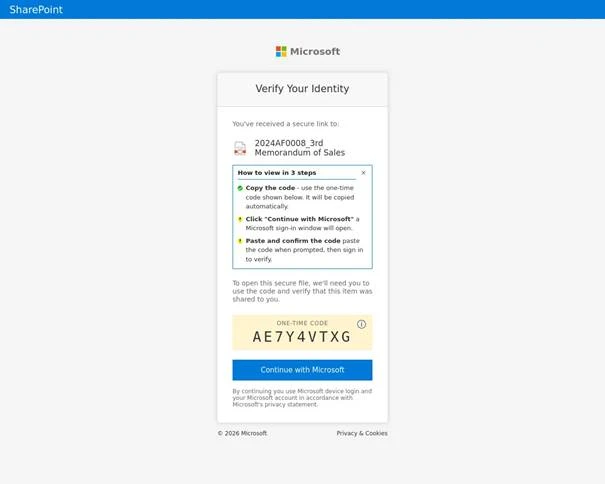
Screenshot of a campaign where the codes were copied to the user’s clipboard from the browser (Source: Microsoft)
Threat actors evade automated URL scanners and sandboxes by using compromised legitimate domains and serverless platforms. The credential theft interface is hosted as a browser-in-the-browser technique that simulates a legitimate browser window within a web page, or it is displayed within a web-hosted document preview with a blurred view. A “Verify identity” button and a device code are displayed.
The campaign uses lures such as document access requests, electronic signing prompts, and voicemail notifications. Users may also be prompted to enter their email addresses to facilitate the generation of a malicious device code. The page is preloaded with hidden automation. To bypass reputation-based filters, threat actors use a combination of domain shadowing and brand-impersonating subdomains.
Threat actors distribute deceptive emails with varied payloads to entice users to interact with a link that leads to a legitimate-looking but threat actor-controlled interface.
When a user clicks the link, they are directed to a web page running a background automation script that interacts with the Microsoft identity platform to generate a live device code. The code is displayed on the user’s screen along with a button that redirects them to the official login portal.
The threat actor’s script may automatically copy the generated device code to the clipboard, which the user then pastes into the official login page. If there is no active session, the user is prompted to provide credentials and complete multi-factor authentication. If a session is already active, pasting the code and confirming the request authenticates the threat actor’s session in the background.
After the legitimate login URL is opened, the script enters a polling state to monitor the authentication process in real time. It repeatedly checks whether the user has completed authentication. Once the MFA-backed login is completed, the next poll returns a success status, and the threat actor obtains a valid access token associated with the user’s account.
Post-compromise activity
“The final stage varies depending on the threat actor’s specific objectives. In some instances, within 10 minutes of the breach, threat actor’s registered new devices to generate a Primary Refresh Token (PRT) for long-term persistence. In other scenarios, they waited several hours before creating malicious inbox rules or exfiltrating sensitive email data to avoid immediate detection,” the Microsoft Defender Security Research Team explained.
Following the compromise, activity progresses to device registration and Microsoft Graph reconnaissance, including filtering compromised users and selecting targets.